Saturday, 23 June 2018

Oracle Database context file Information

https://dbissues.blogspot.com/2018/06/oracle-database-context-file-information.html


Database context file location :-
Database context file called the <CONTEXT_NAME>.xml contains the configuration information for the database tier & is located in /u01/oracle/PROD/db/tech_st
11.1.0/appsutil/Server_PROD.xml <---------(contextfile).
(context_file.xml).

Application context file location :-
Application context file called the <CONTEXT_NAME>.xml contains the configuration information for the application tier & is located in  /u01/oracle/PROD/inst/appl/admin/PROD_Server.xml. <-------(contextfile).

What Contextfile contains:-
 The context file contains host names,domain name , directory structure, port numbers used The AutoConfig feature of Oracle application manager(OAM)
 is used to update & manage context files.

You can check contextfile location by the following command:-
sqlplus!  select NAME,VISSION,PATH  from FND_OAM_CONTEXT_FILES;
Autoconfig work:-

The autoconfig script uses information from the context file to generate all applications configuration files & updates database profiles.

How to Run autoconf:-
Step 1 : Stop all services
$ $INST_TOP/apps/PROD_Server/app/admin/script/adstpall.sh APPS/<apps password>
Step 2:From same above location Run the autoconfig script, $adautocfg.sh .

How to run adconfig in datbase tier:-
/u01/oracle/db/tech_st/11.1.0/appsutil/bin/adconfig.sh <------location
adconfig.sh contextfile=/u01/oracle/db/tech_st/11.1.0/appsutil/PROD_Server.xml <-------(contextfile)

How to run adconfig in Application tier:-
/u01/oracle/apps/apps_st/appl/ad/12.0.0/bin/adconfig.sh <-------location
adconfig.sh contextfile=/u01/oracle/PROD/apps/apps_st/ad/12.0.0/bin/ PROD_Server.xml <---(contextfile)

Why we use adconfig.sh
The adconfig.sh would update the database with the XML entries and create the Listener and TNSNAMES.ora.

What is difference between ADpatch and Opatch:--
ADPATCH is utility to apply ORACLE application Patches whereas OPATCH is utility to apply database patches.

Checking status of all the Concurrent Managers from backend.

https://dbissues.blogspot.com/2018/06/checking-status-of-all-concurrent.html

In Oracle Applications, when we have to check the status of Concurrent Managers, we usually login to Oracle Applications and select the following path:
System Administrator >> Concurrent : Manager >> Administer
On this screen, we see the Actual and Target processes for a concurrent manager and if they are same and nonzero, we conclude that the CM is working fine.
Now, I am going to post a simple sql script which shows the same output as shown in the screen above. Here it goes:
select decode(CONCURRENT_QUEUE_NAME,'FNDICM','Internal Manager','FNDCRM','Conflict Resolution Manager','AMSDMIN','Marketing Data Mining Manager','C_AQCT_SVC','C AQCART Service','FFTM','FastFormula Transaction Manager','FNDCPOPP','Output Post Processor','FNDSCH','Scheduler/Prereleaser Manager','FNDSM_AQHERP','Service Manager: AQHERP','FTE_TXN_MANAGER','Transportation Manager','IEU_SH_CS','Session History Cleanup','IEU_WL_CS','UWQ Worklist Items Release for Crashed session','INVMGR','Inventory Manager','INVTMRPM','INV Remote Procedure Manager','OAMCOLMGR','OAM Metrics Collection Manager','PASMGR','PA Streamline Manager','PODAMGR','PO Document Approval Manager','RCVOLTM','Receiving Transaction Manager','STANDARD','Standard Manager','WFALSNRSVC','Workflow Agent Listener Service','WFMLRSVC','Workflow Mailer Service','WFWSSVC','Workflow Document Web Services Service','WMSTAMGR','WMS Task Archiving Manager','XDP_APPL_SVC','SFM Application Monitoring Service','XDP_CTRL_SVC','SFM Controller Service','XDP_Q_EVENT_SVC','SFM Event Manager Queue Service','XDP_Q_FA_SVC','SFM Fulfillment Actions Queue Service','XDP_Q_FE_READY_SVC','SFM Fulfillment Element Ready Queue Service','XDP_Q_IN_MSG_SVC','SFM Inbound Messages Queue Service','XDP_Q_ORDER_SVC','SFM Order Queue Service','XDP_Q_TIMER_SVC','SFM Timer Queue Service','XDP_Q_WI_SVC','SFM Work Item Queue Service','XDP_SMIT_SVC','SFM SM Interface Test Service') as "Concurrent Manager's Name", max_processes as "TARGET Processes", running_processes as "ACTUAL Processes" from apps.fnd_concurrent_queues where CONCURRENT_QUEUE_NAME in ('FNDICM','FNDCRM','AMSDMIN','C_AQCT_SVC','FFTM','FNDCPOPP','FNDSCH','FNDSM_AQHERP','FTE_TXN_MANAGER','IEU_SH_CS','IEU_WL_CS','INVMGR','INVTMRPM','OAMCOLMGR','PASMGR','PODAMGR','RCVOLTM','STANDARD','WFALSNRSVC','WFMLRSVC','WFWSSVC','WMSTAMGR','XDP_APPL_SVC','XDP_CTRL_SVC','XDP_Q_EVENT_SVC','XDP_Q_FA_SVC','XDP_Q_FE_READY_SVC','XDP_Q_IN_MSG_SVC','XDP_Q_ORDER_SVC','XDP_Q_TIMER_SVC','XDP_Q_WI_SVC','XDP_SMIT_SVC');
save the above SQL in a script as “cmstatus.sql”
Connect as “apps” and run the above script:
sqlplus apps/******

SQL> set pagesize 9999

SQL> @cmstatus.sql

Concurrent Manager's Name                      TARGET Processes ACTUAL Processes
---------------------------------------------- ---------------- ----------------
Service Manager: AQHERP                         1                1
Output Post Processor                           1                1
Workflow Document Web Services Service          1                1
WMS Task Archiving Manager                      2                2
Marketing Data Mining Manager                   5                5
Conflict Resolution Manager                     1                1
Internal Manager                                1                1
Scheduler/Prereleaser Manager                   1                1
Standard Manager                               10               10
PO Document Approval Manager                    3                3
Receiving Transaction Manager                   3                3
FastFormula Transaction Manager                 1                1
PA Streamline Manager                           1                1
Inventory Manager                               5                5
INV Remote Procedure Manager                    5                5
Workflow Agent Listener Service                 1                1
Workflow Mailer Service                         1                1
Transportation Manager                          10               10
C AQCART Service                                1                1
Session History Cleanup                         1                1
UWQ Worklist Items Release for Crashed session  1                1
SFM Controller Service                          1                1
SFM Order Queue Service                         1                1
SFM Work Item Queue Service                     1                1
SFM Fulfillment Actions Queue Service           1                1
SFM Fulfillment Element Ready Queue Service     1                1
SFM Event Manager Queue Service                 1                1
SFM Inbound Messages Queue Service              1                1
SFM Timer Queue Service                         1                1
SFM Application Monitoring Service              1                1
SFM SM Interface Test Service                   1                1
OAM Metrics Collection Manager                  1                1

32 rows selected.
It will show you the similar output as shown by Concurrent Manager Administer screen.

Create New Concurrent Manager in Oracle EBS

https://dbissues.blogspot.com/2018/06/create-new-concurrent-manager-in-oracle.html


1: Connect as System Administrator Go to -->System Administrator Responsibility and Click -->Define Profile Option.


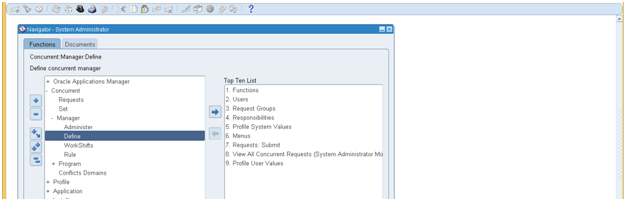
2: Go to Concurrent Click Manager and then Click Define.


3: The Following Screen will  appear.


4:  Fill this form with customized concurrent name.


5: Click on --> workshift  then the following screen will apears.


6: Fill the form like below and save it.


7: Now exit all screen and go --> Concurrent --> Manager --> Administrator


8: Now activate your Customized Concurrent by pressing Activate Option.


9: As You can see My Customized Concurrent is now enabled.


Restart Concurrent manager from backend.

Increase Concurrent Manager in Oracle EBS

https://dbissues.blogspot.com/2018/06/increase-concurrent-manager.html

For my Case

1:  Go to system =administrator responsibility and Click =(Define Profile Options)


2: Click on =Concurrent ->  Manager -> Define


3: Now Press on = F11


4: Now Type Standard Manager like below.


5: Now press ctrl with  F11 


6: Press on work shift .


7: Increase Process from 3 to 6  and press save like below.


8: Now Exit all Screen and go to -->Concurrent --> Manager --> Administrator.


9: Now You can see here Concurrent Manager value is 6.


The End

http://aporaclepayables.blogspot.com/2016/01/online-create-accounting-program-stucks.html

Gather Schema Statistics in Oracle EBS

https://dbissues.blogspot.com/2018/06/gather-schema-statistics.html

Introduction: When the data is updated continuously by updating, inserting or deleting of by users (Functional/Technical/End users), it becomes necessary to gather statistics as the performance of database goes down. Cost-Based Optimizer (CBO) - The CBO uses database statistics to generate several execution plans, picking the one with the lowest cost, where cost relates to system resources required to complete the operation. Oracle E-Business Suite provides a set of procedures in the FND_STATS package to facilitate collection of these statistics. FND_STATS uses the DBMS_STATS package to gather statistics.

Run Gather Scheme From Back End:


Use the following command to gather schema statistics:
exec fnd_stats.gather_schema_statistics(‘ONT’) < For a specific schema >
exec fnd_stats.gather_schema_statistics(‘ALL’) < For all schemas >

How to run Gather Schema Statistics in ALL Schema's:


1: Run Single Request .


2: Type Gather Schema with percentage as below and press TAB.


3: The following image appears.


4: Fill the form like below.


5: Press OK and then press Submit.


6: Gather Schema is in Process.


Parameters Introduction:


Schema Name: In this parameter you have specify schema name Or All For all schema name.

Estimate Percent: Not Allowed in 11g oracle works here automatically.

Degree: Cpu x cores

Backup Flag: Backup previous last run gather stats.

Restart Request ID: Submit request id in case of error restart through request after when issue was resolved.

History Mode: Save history of last run gather stats.

Gather Options: Auto Gather which run only on incremental changes.

Modification Threshold: The default is 10% (i.e. meaning any table which has changed via DML more than 10%, stats will be collected, otherwise it will be skipped).

Invalidate Dependent Cursor:

===========Error:===========


**Starts**03-JAN-2018 22:03:26

ORACLE error 20005 in FDPSTP

Cause: FDPSTP failed due to ORA-20005: object statistics are locked (stattype = ALL)

ORA-06512: at "APPS.FND_STATS", line 780

ORA-06512: at line 1

The SQL statement being executed at the time of the error was: and was exe

+---------------------------------------------------------------------------+

Start of log messages from FND_FILE

+---------------------------------------------------------------------------+

In GATHER_SCHEMA_STATS , schema_name= ALL percent= 10 degree = 2 internal_flag= NOBACKUP

stats on table FND_CP_GSM_IPC_AQTBL is locked

stats on table FND_SOA_JMS_IN is locked

stats on table FND_SOA_JMS_OUT is locked

ORA-20005: object statistics are locked (stattype = ALL)

+---------------------------------------------------------------------------+

Query to Check Locked Schema Objects:

select table_name, stattype_locked from dba_tab_statistics where owner = '<schema>' and stattype_locked is not null;

Query to Check All Locked Schema Objects:

select table_name, stattype_locked from dba_tab_statistics where stattype_locked is not null;

Solution:


Unlock:

EXEC DBMS_STATS.UNLOCK_TABLE_STATS(USER,' FND_CP_GSM_IPC_AQTBL');

EXEC DBMS_STATS.UNLOCK_TABLE_STATS(USER,'FND_SOA_JMS_IN');

EXEC DBMS_STATS.UNLOCK_TABLE_STATS(USER,'FND_SOA_JMS_OUT');

Run Gather Schema:

EXEC DBMS_STATS.GATHER_TABLE_STATS(USER,'FND_CP_GSM_IPC_AQTBL');

EXEC DBMS_STATS.GATHER_TABLE_STATS(USER,'FND_SOA_JMS_IN');

EXEC DBMS_STATS.GATHER_TABLE_STATS(USER,'FND_SOA_JMS_OUT'); 

To generate unlock statement for all tables in the schema you can use following,
select ‘exec DBMS_STATS.UNLOCK_TABLE_STATS (”’|| owner ||”’,”’|| table_name ||”’);’ from dba_tab_statistics where owner = ‘<schema>” and stattype_locked is not null;

Oracle Database Health Check

https://dbissues.blogspot.com/2018/06/oracle-database-health-check.html

1: Check the free space of all mount points from the following command.
Command: df -h

################################################################

2: Check is there any unwanted file or folder which is taking space but don't delete them only tell their
database administrator (You have to check this manually).

#################################################################

3: Check the database size where all the data files are present with the following command.

for example :

cd /u01/oracle/PROD/db/apps_st

Command: du -sh data

#####################################################################

4: Check the amount of memory through the following command and check how much memory is utilizing and how much is free.

Command : top

#######################################################################

5: Must check thier user and group name is database and application is running on same user and group

Or different from the following command.


Command: ls -alrt

##########################################################################

6: Check all users password's check is there any password which is set to default .
for example:

/as sysdba

system / manager

apps/apps

gl/gl

ap/ap

Note: If there is any password which is set to default as above tell there database administrator to change it.

#####################################################################

7: Check from which parameter file database instance is running. Is it is running with pfile Or spfile. from the following command.

Command :

sql>show parameter spfile

Note : Please if it is running with pfile please tell thier database adminitrator to run thier database with

spfile because pfile is easily editible.

#######################################################################

8: Check control file status from sqlplus from the following command. If all control file set to same mount points are same location tell their database administrator to multiplex it.

connect as sysdba
SQL> select status, name from v$controlfile;

STATUS NAME
------- ---------------------------------
/u01/oradata/L102/control01.ctl
/u02/oradata/L102/control02.ctl

###############################################################

9: Check number of Datatop's from the following commands.

conn sqlplus

sql> select filename from dba_data_files;

##############################################################################

10: Check the archiving is enabled and log file is switching successfully to its position. from the following command.

To check location

sql> archive log list.

Switch logfile to check weather its switching to its position or not.

sql> alter system switch logfile.

########################################################################

11: Check alert log file check is there is any error inside error log .Check location from the following command.
sql> show parameter background;

###########################################################################

12: Check rman backup policy from rman through the following command and check Rman backup log

check if there is any error inside or not.

Rman> show all;

#############################################################################

13: Check the tablespace size from following command if need to add tell their database administrator add it.

SELECT a.tablespace_name,

ROUND (((c.BYTES - NVL (b.BYTES, 0)) / c.BYTES) * 100,2) percentage_used,

c.BYTES / 1024 / 1024 space_allocated,

ROUND (c.BYTES / 1024 / 1024 - NVL (b.BYTES, 0) / 1024 / 1024,2) space_used,

ROUND (NVL (b.BYTES, 0) / 1024 / 1024, 2) space_free,

c.DATAFILES

FROM dba_tablespaces a,

( SELECT tablespace_name,

SUM (BYTES) BYTES

FROM dba_free_space

GROUP BY tablespace_name

) b,

( SELECT COUNT (1) DATAFILES,

SUM (BYTES) BYTES,

tablespace_name

FROM dba_data_files

GROUP BY tablespace_name

) c

WHERE b.tablespace_name(+) = a.tablespace_name

AND c.tablespace_name(+) = a.tablespace_name

ORDER BY NVL (((c.BYTES - NVL (b.BYTES, 0)) / c.BYTES), 0) DESC;

##############################################################################

14: Check how much temporary tablespace is running from the following command.

sql> select tablespace_name, sum(bytes)/1024/1024 mb

from dba_temp_files

group by tablespace_name;

#############################################################################

15: Check which temporary tablespace is set to default from the following command.
select * from database_properties where property_name like 'DEFAULT%TABLESPACE';

#################################################################################

16: Check current usage of temporary tablespace.

select ss.tablespace_name,
sum((ss.used_blocks*ts.blocksize))/1024/1024 mb
from gv$sort_segment ss, sys.ts$ ts
where ss.tablespace_name = ts.name
group by ss.tablespace_name;


Note : If need to add than tell thier database administrator to add.

############################################################################

17: Check the size of undo tablespace from the following command.

sql> select tablespace_name,sum(bytes)/1024/1024 "MB" from dba_data_files where TABLESPACE_NAME like '%UNDO%' group by tablespace_name;

#################################################################################

18: check name and retention policy of undo tablespace from the following command.


sql> show parameter undo;

#################################################################################

19: Check the datafile size of undo tablespace from the following command.

select FILE_NAME,TABLESPACE_NAME,sum(bytes)/1024/1024 "MB" from dba_data_files where TABLESPACE_NAME like '%UNDO%' group by FILE_NAME,TABLESPACE_NAME;

##########################################################################

20: Check free space of tablespace.

SELECT SUM(BYTES)/1024/1024 "MB" FROM DBA_FREE_SPACE WHERE TABLESPACE_NAME ='UNDO_TBS';

Note: if need to add then tell their database administrator to add datafile.

#####################################################

21: Check the last log of adpreclone.pl on database Tier check is thier any error inside the log or not from the following location.

for example:

/u01/oracle/VIS/db/tech_st/11.1.0/appsutil/log/VIS_erp/StageDBTier_12251847.log

############################################################################

22: Check the last log of adpreclone.pl on APPS Tier check is their any error inside the log or not from the following location.

for example:

/u01/oracle/VIS/inst/apps/VIS_erp/admin/log/StageAppsTier_12251850.log

#################################################################################

22: Check invalid objects through the following command.

sql> select OWNER,OBJECT_NAME,OBJECT_TYPE,STATUS from dba_objects where status='INVALID';

################################################################################

23: Check tnsnames.ora file to check dataguard tns ping is successful or not through the following command.

Command: tnsping standby

###############################################################################

24: Check cold backup going fine check previous backup size and current backup size through the following command.

Command : du -sh

##############################################################################

25: Check hosts file from location to verify standby ip and hostname through the following command
and ping standby ip on primary server to check no network break found between standby and primary.

cat /etc/hosts

################################################################################

26: Check recycle bin is there any unwanted data is stored in recycle bin from the following command.

select * from recyclebin.

Note: Is there any data which is in recycle bin tell their dba to purge recyclebin to realease space from database.

#################################################################################

27: Sga should be at least 40% or more then 40% of total ram. and check pga must be 20% of sga or higher.

#################################################################################

28: Check DBA_USERS to verify is there any unwanted or expired custom user is there with the following command.

sql> select * from dba_users;

#################################################################################

29: check is there any user which have dba role through the following command.

sql>select * from DBA_ROLE_PRIVS;

#################################################################################

30: check dba_db_links to check is there any unwanted db_link is there through the following command.

sql> select * from dba_db_links;

#################################################################################

31: Check crontab to verify how much job are running automatically and also check are all shell scripts doing there job successfully or not through the command.

crontab -l

#################################################################################

32: Run active user report and active responsibility report from front end to check whether is there any.

expired user left or not.

#################################################################################

33: Check the concurrent status from end that how many concurrent is running and how many is free check this for load testing.

#################################################################################

34: Check is there is any corruption in database.

select * from V$DATABASE_BLOCK_CORRUPTION;

#################################################################################

34: Check audit logs from backend. through the command .

SQL> show parameter audit.

#################################################################################

35: The v$resource_limit shows the current and maximum global resource utilization for some system resources.

sql> select * from v$resource_limit where resource_name in ('processes','sessions',transactions');

#################################################################################

36: Generate AWR report for health check .

sql> @$ORACLE_HOME/rdbms/admin/awrrpt.sql <---AUTOMATUC WORK REPOSITORY

#################################################################################

37: ADDM report provides Findings and Recommendations to fix the issue.

SQL> @?/rdbms/admin/addmrpt.sql

#################################################################################

38: Check database status.

sql> select name DB_NAME,HOST_NAME,DATABASE_ROLE,OPEN_MODE,version DB_VERSION,LOGINS,to_char(STARTUP_TIME,'DD-MON-YYYY HH24:MI:SS') "DB UP TIME" from v$database,gv$instance;

#################################################################################

39 : EBS Database Parameter Settings Analyzer (Doc ID 1953468.1)

conn apps/apps

>@db_param_analyzer.sql

fnd users = 300

#################################################################################

40: Undo adviser How much undo have you needed and how much you have.

col "ACTUAL UNDO SIZE [MByte]" for 999999999

col "UNDO RETENTION [Sec]" for a20

col "OPTIMAL UNDO RETENTION [Sec]" for 999999999

SELECT d.undo_size/(1024*1024) "ACTUAL UNDO SIZE [MB]",

SUBSTR(e.value,1,25) "UNDO RETENTION [Sec]",

(TO_NUMBER(e.value) * TO_NUMBER(f.value) *

g.undo_block_per_sec) / (1024*1024)

"NEEDED UNDO SIZE [MB]"

FROM (SELECT SUM(a.bytes) undo_size FROM v$datafile a, v$tablespace b, dba_tablespaces c WHERE c.contents = 'UNDO'

AND c.status = 'ONLINE' AND b.name = c.tablespace_name AND a.ts# = b.ts# ) d, v$parameter e, v$parameter f, (

SELECT MAX(undoblks/((end_time-begin_time)*3600*24)) undo_block_per_sec FROM v$undostat ) g WHERE e.name = 'undo_retention'

AND f.name = 'db_block_size';

#################################################################################

Allow and Deny Hosts to connect Linux Operating System

https://dbissues.blogspot.com/2018/06/allow-and-deny-hosts-in-oracle-database.html

Allow Hosts


cd  /etc
[root@testweb etc]# vi hosts.deny


x


Deny Hosts:


cd  /etc
vi  hosts.deny


After setting the above parameter no one can connect now.